> ## Documentation Index
> Fetch the complete documentation index at: https://developers.podero.com/llms.txt
> Use this file to discover all available pages before exploring further.
# Register Application
> Create an OAuth2 application to access the Partner API
# Register a New Application
Log in at [https://app.podero.com/accounts/login/](https://app.podero.com/accounts/login/) with the credentials you received.
It is strongly recommended that you change the password after your first login.
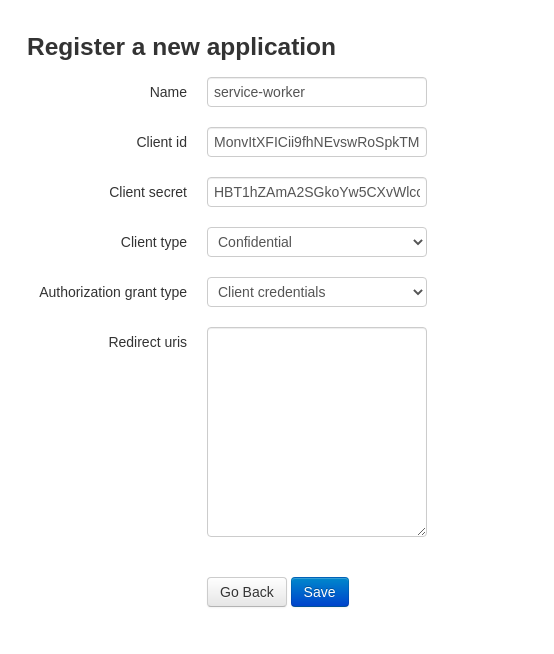
Visit [https://app.podero.com/oauth2/applications/register/](https://app.podero.com/oauth2/applications/register/) (or use your sandbox URL subdomain) to create a new client application.
Fill in the application details:
| Field | Value |
| ---------------------------- | --------------------------- |
| **Name** | Your application name |
| **Client Type** | Confidential |
| **Authorization Grant Type** | Client Credentials |
| **Redirect URIs** | Not necessary (leave empty) |
**Immediately copy the client ID and the client secret and keep them somewhere safe.**
You will not be able to retrieve your client secret later.
After copying your credentials, save the application.
 ## What You Received
After registration, you should have:
* **Client ID**: A unique identifier for your application
* **Client Secret**: A secure key that proves your application's identity
Store these credentials securely using environment variables or a secrets management system. Never commit them to source control.
## Next Step
Generate your first API access token
## What You Received
After registration, you should have:
* **Client ID**: A unique identifier for your application
* **Client Secret**: A secure key that proves your application's identity
Store these credentials securely using environment variables or a secrets management system. Never commit them to source control.
## Next Step
Generate your first API access token