

Server-to-Server Authentication
The Partner API uses the OAuth2 Client Credentials flow for secure server-to-server communication.
Prerequisites
1
Receive Initial Credentials
Contact your account manager to receive your initial admin username and password.
2
Login to Platform
Log in at https://app.podero.com/accounts/login/ (or use your sandbox URL subdomain).
Register a New Application
1
Access Application Portal
Visit https://app.podero.com/oauth2/applications/register/ (or use your sandbox URL subdomain) to create a new client application.
2
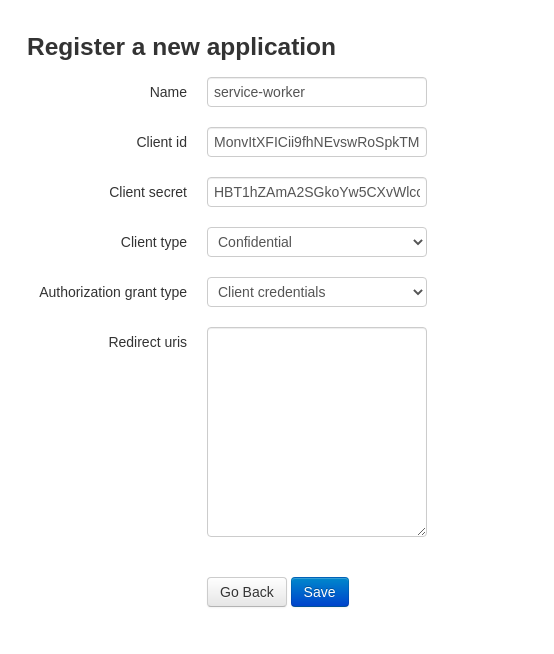
Configure Application
Fill in the application details:
- Name: Your application name
- Client Type: Select Confidential
- Authorization Grant Type: Select Client Credentials
- Redirect URIs: Not necessary (leave empty)
3
Save Credentials Immediately
Save the application after copying your credentials.
Generating an Access Token
To get an access token and to be able to use the API, you need to make a request to the token endpoint with a Basic Auth header using your base64 encoded client ID and secret.Request
Response
You will receive a response containing an access token, as well as the expiration time.string
required
Bearer token for API authentication. Use this in the Authorization header for all subsequent API requests.
integer
required
Token lifetime in seconds. Typically 36000 seconds (10 hours).
string
required
The type of token. Always “Bearer” for this flow.
string
required
The scopes granted to this token. Typically “read write” for full access.
Using the Access Token
For subsequent requests to the API, include the access token in the Authorization header:Example API Request
Refreshing the Token
Refreshing the token can be done with the same request you used to get the initial token. There is no refresh token - simply request a new access token using your client credentials.
/oauth2/token/ with your client credentials to obtain a new access token.
Best Practices
Secure Storage
Secure Storage
- Store client secrets in environment variables or secure vaults
- Never commit credentials to source control
- Use different credentials for each environment (production, sandbox)
Token Management
Token Management
- Implement automatic token refresh before expiration
- Handle 401 Unauthorized responses by refreshing the token
- Cache tokens to avoid unnecessary token requests
Error Handling
Error Handling
- Implement retry logic for transient failures
- Log authentication errors for debugging
- Monitor token expiration and refresh patterns
Next Steps
Getting Started
Follow our step-by-step tutorial
User Journeys
Explore common workflows